Bringing Tactile Luxury to Digital Screens with a Realistic Letterpress Effect Mockup
There is a specific kind of satisfaction that comes from holding a piece of heavy, cotton paper and feeling the deep indentation of a logo pressed into its surface. It signals quality, permanence, and a level of care that flat digital files simply cannot convey on their own. For designers and brand strategists working in a predominantly digital world, bridging this gap between the screen and the physical sense of touch is one of the biggest challenges. This is where a Realistic Letterpress Effect Mockup becomes an indispensable tool. It isn't just about making a logo look old-fashioned; it is about simulating the physics of metal type meeting organic material to create an illusion of depth that feels undeniably real.
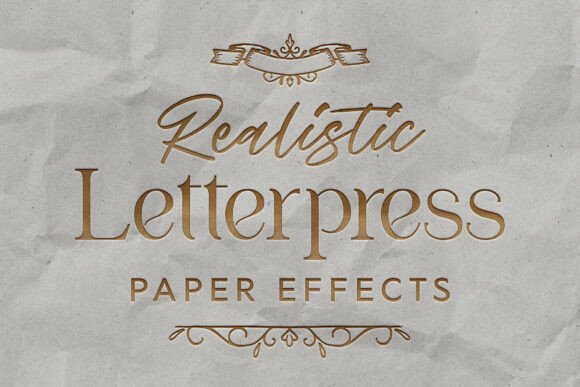
At its core, this type of mockup is a high-fidelity Photoshop template engineered to replicate the beautiful, tactile depth of a physical deboss. When you utilize a template built at a professional resolution of 4500x3000 pixels, you aren't just adding a drop shadow; you are capturing the fine micro-textures of premium paper stock. The effect simulates the exact moment pressure is applied, leaving behind sharp, sunken impressions and subtle, realistic shadow gradients inside the grooves. This brings an undeniable sense of quiet luxury to digital designs, allowing clients to visualize their brand identity as if it were already printed on expensive stationery.
Elevating Brand Presentations for High-End Clients
The most immediate application for these tools lies in the realm of luxury branding. Consider the scenario of a graphic designer pitching a new identity to a boutique hotel chain or a high-end jewelry line. Showing a flat, vector logo on a white background often fails to communicate the weight and prestige the client expects. By dropping that same logo into a Realistic Letterpress Effect Mockup, the presentation shifts entirely. The client sees their emblem sunk perfectly into thick, textured paper, complete with the natural irregularities of organic cotton stock.
This visual trickery works because it taps into the viewer's sensory memory. Even though they are looking at a screen, the brain recognizes the interplay of light and shadow within the depressed letters as a sign of physical quality. For industries like wedding planning, artisanal coffee roasters, or bespoke tailoring, this aesthetic is not just decorative; it is part of the brand promise. Using a mockup that includes multiple paper textures—perhaps nine different varieties ranging from smooth finish to rough grain—allows you to tailor the presentation to match the specific personality of the brand. A rugged, textured background might suit an outdoor gear company, while a smooth, crisp white stock fits a minimalist architectural firm.
Showcasing Typography and Custom Lettering
Type designers and calligraphers face a unique hurdle: their work is often judged by its form, but its true character is revealed in how it interacts with space and material. A Realistic Letterpress Effect Mockup serves as a powerful portfolio piece for highlighting custom font designs. When typography is rendered with a debossed effect, the thickness of the strokes, the spacing between kerning, and the sharpness of the serifs become much more apparent.
The non-destructive Smart Object system found in high-quality PSD templates makes this process incredibly fluid. You can simply drop in your clean vector logo or typeface, and the template automatically calculates the lighting and depth. This is particularly useful when exploring how a font behaves under different lighting conditions. Some templates include various shadow overlays—up to eight different variations—that let you simulate morning light, harsh noon sun, or soft studio lighting. This variability helps type designers prove the versatility of their creations, showing potential buyers how the font will look on business cards, embossed invitations, or packaging labels without needing to physically print a single sheet.
The Practicality of Non-Destructive Workflows
Beyond the aesthetic appeal, the practical value of these mockups lies in their efficiency. In a professional setting, time is money. Creating a realistic letterpress effect from scratch in Photoshop requires a deep understanding of blending modes, displacement maps, and lighting effects. It is a time-consuming process that can take hours to get right for a single image. A pre-built, optimized PSD template condenses this workflow into seconds.
The magic happens through the Smart Object layer. Because the system is non-destructive, you can swap out designs endlessly without degrading the image quality or losing your setup. This is ideal for agencies that need to produce multiple variations of a brand identity quickly. Whether you are creating a social media post to announce a new logo or compiling a case study for your website, the ability to generate photorealistic results instantly allows you to focus on strategy rather than technical execution. Furthermore, the inclusion of crumpled paper overlays adds another layer of realism, suggesting that the item has been handled and loved, which can be a compelling narrative element for lifestyle brands.
Considerations Before Choosing Your Template
While the benefits are clear, selecting the right Realistic Letterpress Effect Mockup requires a bit of discernment. Not all templates are created equal. The resolution is the first thing to check; anything below 300 DPI may look acceptable on a phone screen but will appear pixelated if the client wants to use the image in a high-resolution PDF proposal or a printed portfolio. A dimension of 4500 x 3000 px is generally the sweet spot for modern displays and print requirements.
Another critical factor is the variety of textures included. A single paper type limits your storytelling ability. If you are working with a diverse client base, you need a template that offers a range of paper stocks. Additionally, consider the complexity of the shadows. Real letterpress printing creates soft, diffused shadows inside the grooves of the letters, not hard, black outlines. Look for templates that demonstrate a nuanced understanding of light physics. The best mockups also provide instructions and font links, ensuring that even if you are new to Photoshop, you can achieve professional results immediately.
It is also worth noting the limitations. While these mockups are incredibly realistic, they are still simulations. They work best with vector-based logos and typography that have clear, defined edges. Highly detailed photographs or gradients may not translate well into a debossed effect, as the physical process of letterpress relies on solid shapes to create the impression. Understanding this ensures you use the tool where it shines brightest: on logos, monograms, and typographic compositions.
Transforming Digital Concepts into Tangible Dreams
Ultimately, the goal of any design mockup is to help the viewer imagine the final product. A Realistic Letterpress Effect Mockup does this exceptionally well by adding a layer of physicality to the digital realm. It turns a flat concept into something that feels substantial and valuable. Whether you are a freelancer looking to upgrade your portfolio, a branding agency pitching to luxury clients, or a type designer showcasing your latest release, these tools provide the bridge between imagination and reality.
By leveraging high-quality PSD files with smart organization, you can present your work with a level of polish that commands attention. The subtle gradients, the micro-textures of the paper, and the precise depth of the impression all contribute to a narrative of quality. In a market saturated with flat design and digital noise, offering a vision of tactile elegance can be the deciding factor that wins over a client or sells a font. It is a small investment in a tool that yields a massive return in perceived value.